Log In
- Create or log into your account at CoveredCA.com.
- Scroll to the Account Information section and click on the carrot (V) on the right to revel the options.
- Select "Manage Delegates".
Covered CA enrollment process resources.

- Create or log into your account at CoveredCA.com.
- Scroll to the Account Information section and click on the carrot (V) on the right to revel the options.
- Select "Manage Delegates".
- Then scroll up and select "?" symbol.
- Select “Find Local Help”.
- Then click on the yellow box that says “Find Agent”.
- Search by Name and type “Marshawn Harris”.
- Click on “Marshawn Harris” highlighted in blue & hit continue.
- Click on “Select this Agent.
- Complete the Agent Designation Page by clicking on the 4 boxes and typing your full name.
- You will then see the word “Congratulations” if you have been successful.
- Then select “Close”
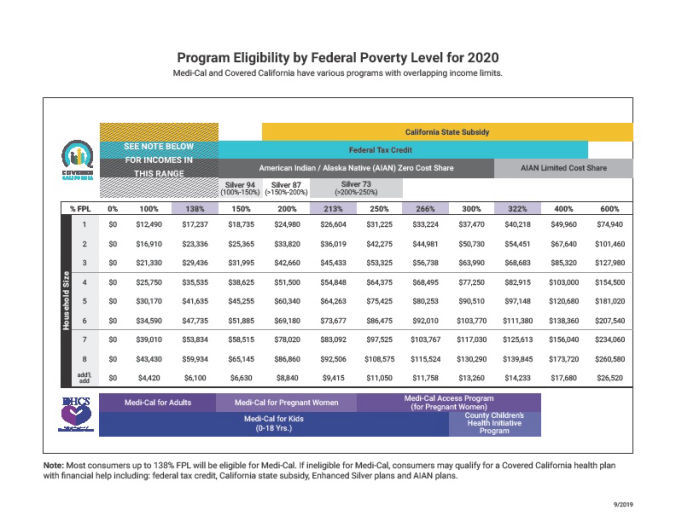
The Covered California Income Guidelines chart shows who is eligible based on income. Pregnant women, children and disabled persons are allowed to have a higher income on the federal poverty level scale and are urged to apply.